How to Build a RAG Chatbot for Your Website: What It Costs and What Makes It Trustworthy
By Amin Rabinia · Founder, Glissando AI
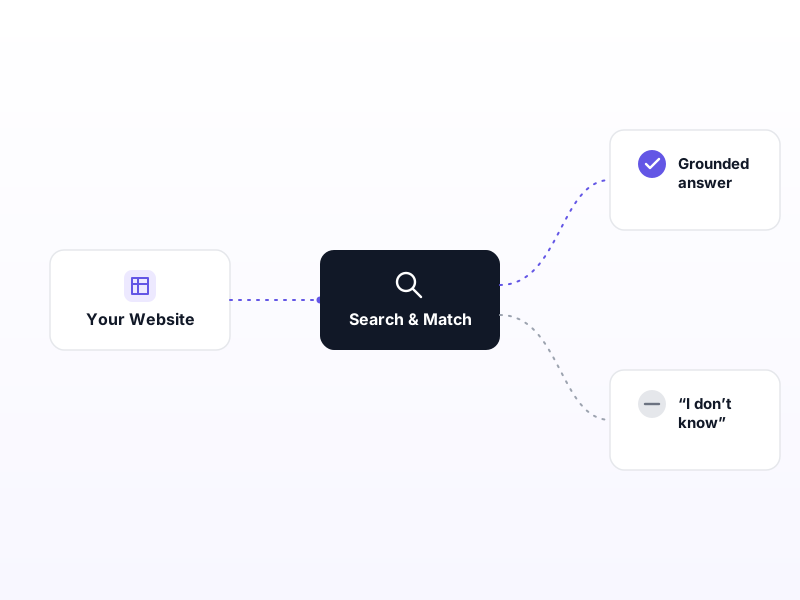
If you're researching a RAG chatbot for your own website, you've probably found a hundred articles explaining chunking, embeddings, and vector databases. Almost none of them answer the question you actually have: is this worth putting in front of a customer, what does it cost, and how do you know it won't embarrass you.
Those are the right questions. A chatbot on your marketing site is a specific kind of AI product with a specific bar to clear. We rebuilt ours on glissando.ai in September 2026, replacing a hand-maintained assistant with a measured, grounded one, and ran it the way we'd run a client engagement: write the test before the code, measure everything, and publish the negative results too. What follows is what that process actually taught us about running one of these on a real business's site.
What a Marketing Chatbot Actually Has to Get Right
An assistant that answers from your own content is retrieval-augmented generation, or RAG: instead of trusting the model's general knowledge, you hand it the relevant paragraphs from your site and tell it to answer from those. That's the whole idea, and it's simpler than the tutorials make it sound.
What's different about putting one on a public marketing site, versus an internal tool, is who's on the other end of the conversation. An employee using an internal knowledge base already trusts the company and can shrug off a wrong answer. A prospect deciding whether to hire you is testing you, and a wrong answer doesn't just fail to help; it actively costs you the sale. That's a narrower, higher-stakes bar than most RAG write-ups are built for, and it's why the questions worth asking are about trust and cost, not architecture.
What It Costs to Run
The economics are the pleasant surprise. Indexing our entire site, roughly 84 pages, 322 chunks, costs about $0.0007. A response takes about 2 seconds. There's no vector database and no second service to keep running: at this size, the whole index is a compressed file baked into the same container that serves the answer, and it's faster to search in full than a database round-trip would be. The new version also got faster than the one it replaced, despite using a larger, better model; removing an old page-fetching step more than paid for the upgrade.
For most businesses this makes a grounded chatbot an unusually cheap first AI product: contained scope, a visible failure mode, and a result you can point to. It's a reasonable place to start if you're deciding what to build first with a modest budget.
The Failure That Makes This Different From a Toy Demo
Here's the risk that should drive every decision you make about one of these. Our old assistant answered from a block of text hand-written into its prompt. On the day we replaced it, that text was still advertising a service line we'd discontinued and a pricing ladder that no longer existed, because nothing in the system ever checked. It just sat there, quietly wrong, for however long nobody noticed.
It got worse when we tested what happens with no grounding at all. Asked what an MVP costs, one model said "$10,000 to $50,000." Another said "$15k–$100k." Both fluent. Both plausible. Both wrong for our business. A language model that doesn't know an answer doesn't say so by default, it produces the most likely-sounding answer, and "likely-sounding" and "true" are different things. A misquoted price in front of a prospect is worse than having no assistant at all.
That single fact is the whole argument for building this carefully rather than wiring up the fastest tutorial you can find.
Why Does My RAG Chatbot Give Wrong Answers?
If you already have one and it's giving bad answers, the instinct is to reach for a better model. That's usually the wrong fix. Our accuracy, measured as recall@5, the odds the right source shows up in the top 5 retrieved passages, went from 62% to 83% with no change of model and no fancier retrieval. It came entirely from how the content was divided up for the system to search.
The clearest example: our homepage FAQ was stored as one block containing eight unrelated questions. An embedding is one point in space, so that chunk's meaning was the average of eight different topics, and it matched none of them well. Asking "do I own the code at the end" scored a weak 0.295 match against the merged block. Split into one chunk per question, the same query scored 0.613 against the right chunk, more than double. Two other questions moved by similar margins once they got their own chunk.
The lesson generalizes: if your assistant gives wrong answers, the fix is almost never a bigger model. It's the content, and how it's organized for search. That also means the quality of your own website or documentation is the ceiling on how good the assistant can ever be. Messy, redundant, or buried content produces a messy, redundant, or confused assistant no matter what you build on top of it. If you're weighing this approach against training a model on your own data instead, RAG vs. fine-tuning covers when each one actually applies.
Teaching It to Say "I Don't Know"
The plan was to have the assistant stay quiet whenever its confidence score was low. It doesn't work, and the reason is worth understanding before you build the same thing. We found a question the site genuinely does answer scoring 0.370, while a question it does not answer scored higher: 0.501. If we'd built a threshold, it would have blocked the answerable question and let the unanswerable one through.
The reason is that a similarity score measures topical closeness, not whether an answer is actually present. "Who are your clients" retrieves passages that talk intensely about clients, covering confidentiality terms and non-poaching language, which is topically on-target and useless as a response.
The fix was to stop asking the score to make that call and instead tell the model directly, in plain language, that "the site doesn't cover this" is a correct answer, not a failure to be papered over. Once we did, it went from declining correctly 2 times out of 6 to 5 out of 6. It's worth saying plainly: an assistant that always answers is less useful than one that admits a miss. If you're building one and skip this step, you'll end up with a confident answer machine, which is exactly the risk described above.
The Failures Are Silent, Which Is Why You Have to Measure It
Nothing about a bad RAG answer looks like a bug. When retrieval pulls the wrong passage, nothing crashes, nothing logs an error. The model just writes a fluent, confident answer on top of the wrong material. Without deliberately testing for it, nobody finds out, least of all whoever built it.
That's why we wrote a 30-question test set, phrased the way an actual visitor would type them, before writing any retrieval code, and re-ran it after every change. Three of the findings above only surfaced because the measured result disagreed with what we assumed was true. If you commission one of these for your own site, ask your builder how they'll know it's working; "we tested it manually" is not an answer. We wrote up the full evaluator taxonomy we used for this, a structured way to test AI systems, for anyone who wants the depth.
What It Can't Leak, and Why That Matters
A chatbot that only reads your public website has a useful property by construction: it has no path to client files, internal pricing sheets, or anything else that never got published. It can't quote or leak what it was never given access to, not because a policy tells it not to, but because it's simply not there.
The honest flip side is that gaps in your website become gaps in the assistant. It can't invent an unpublished answer, which means the questions it can't answer are effectively a content backlog, a useful signal, not just a limitation. This is also where the requirements change if you're pointing the same technology at an internal knowledge base or a regulated domain instead of a public marketing site: the confidentiality boundary moves, the acceptable error rate tightens, and "I don't know" may not be an adequate answer for a compliance question the way it is for a pricing one. Don't assume a marketing chatbot and an internal one need the same build.
It Should Stay Current Without You Touching It
A hand-maintained knowledge blob drifts because nobody remembers to update it. A grounded chatbot should rebuild its index automatically every time your site changes, and only redeploy when content actually changed: a font tweak shouldn't trigger a rebuild, a new case study should. Ours does this on every publish, and we verified it end to end: a page published at 3:39am was answerable by 3:42am.
It caught something we missed, too. After we removed a set of offers from the site, a routine check asked the assistant about one of them, and it still said yes, because a leftover banner elsewhere still promised it. The chatbot worked as an accidental content linter, surfacing stale copy we hadn't noticed ourselves.
The Restraint That's Easy to Skip
One decision worth a mention: at this size, we didn't need a vector database, and we built and measured a more sophisticated retrieval method and left it turned off because it didn't actually improve results. It's tempting to add infrastructure because it sounds more serious. The harder, more valuable judgment call is knowing when not to, because that's what keeps a build in budget and keeps there being fewer moving parts to break.
How You'd Know It's Working
If you're evaluating a proposal for one of these, from us or anyone else, ask for numbers, not a demo. A demo shows you the happy path once. Ask what percentage of real questions it answers correctly, whether that's measured on the actual system in production or a stand-in for it, and what happens when it doesn't know something. If the answer to that last one is "it tries its best," that's the gap this whole post is about.
We've also written about the gap between a weekend chatbot and a production-safe one, and about the simpler version of this: a document-search bot over your own files, if your use case is internal rather than public-facing. The full technical build, including every metric in this post, is documented at our RAG chatbot case study.
Get Expert Input if you're deciding whether this is the right first AI project for your business, or want a second opinion on a proposal you already have.
Related reading
- Is an AI Chatbot Safe for Your Small Business Website?
- Can AI Answer Questions From Your Company Documents?
- RAG vs. Fine-Tuning: Which AI Approach Actually Works for Your Business?
- A Structured Way to Test Whether Your AI Actually Works
This post is part of the AI Agents Guide.
Get the next one in your inbox
One practical AI idea per week, from real client projects. No fluff, unsubscribe anytime.