Is an AI Chatbot Safe for Your Small Business Website? What We Learned From Ours
By Amin Rabinia · Founder, Glissando AI
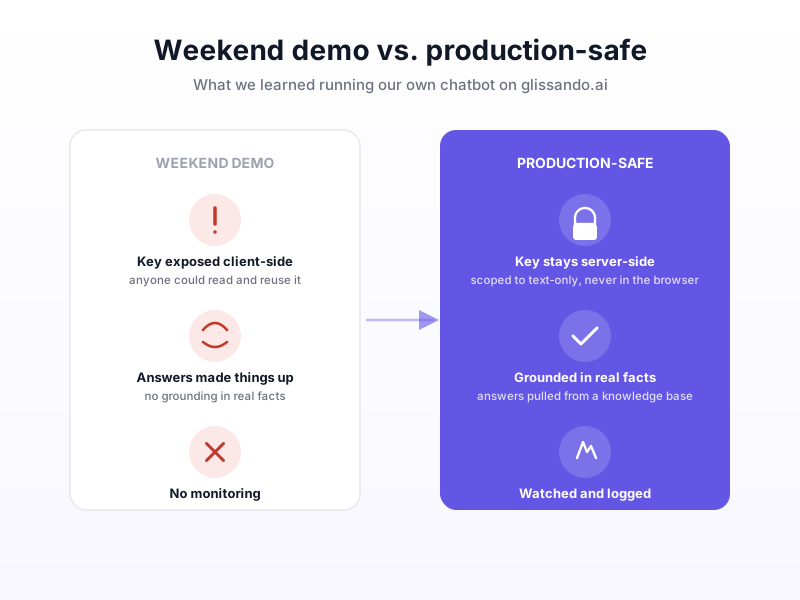
There's a chat bubble in the bottom-right corner of this site. We built it, we use it, and we've rebuilt it more than once. If you're wondering whether an AI chatbot is actually safe to put on your own small business website, the honest answer is: it depends entirely on which version you build: the weekend demo or the production-safe one. We've shipped both, on our own site, and the gap between them is bigger than it looks.
Why We Put a Chatbot on Our Own Site
We could have skipped this. A chatbot isn't required to run an AI consultancy, and plenty of businesses do fine with a contact form. We added one because we wanted to know, firsthand, what it actually takes to run one well, not from a vendor's pitch deck, but from operating it ourselves, with our own traffic, our own edge cases, and our own mistakes.
That's turned out to be the right call, because the lessons weren't the ones you'd expect from a marketing page about chatbots. The interesting problems weren't "does it answer questions well." They were security and honesty, and both showed up the hard way.
What a Weekend Chatbot Demo Actually Looks Like
The first version of our chatbot worked. It answered questions, it looked polished, and it took very little time to put together, which is exactly the problem. An early version handled its API key in a way that could have exposed it to anyone who looked closely at how the widget talked to its backend. Nothing catastrophic happened, but it's exactly the kind of gap that a "vibe-coded" weekend build tends to have: it works in the demo, and the parts that matter for actually running it safely were never built in the first place.
This is a pattern we see constantly in AI products generally, not just chatbots: the first working version is never the final product. The difference with a chatbot is that "the final product" isn't just about better answers. It's about not handing a stranger a way to run up your bill or misuse your credentials, which a chat widget, something anyone on the internet can open and start typing into, is uniquely exposed to.
Security Isn't Optional Even for "Just a Chatbot"
It's tempting to treat a website chatbot as a low-stakes feature. It's just answering FAQs, so what's the worst that happens? The worst that happens is that whatever credentials power it get exposed, and someone else uses your account to do something expensive or harmful, on your dime, without you noticing until the bill arrives or the abuse is already underway.
The fix isn't complicated, but it has to be deliberate. The API key has to live on the server, never in anything the browser can inspect. It should be scoped down to only the specific capability the chatbot actually needs: for a text-only assistant, that means a key restricted to text generation, with no ability to touch image or video generation endpoints even if someone tries to coax it into attempting that. And someone needs to actually watch what's hitting the widget, because the alternative, building it once and never looking again, is how a small oversight turns into a real incident months later.
None of this is exotic. It's the same discipline behind any production system that's exposed to the public internet. The difference is that a chatbot widget invites exactly the kind of interaction, free-form text input from anyone, anytime, that makes it worth double-checking these things before it goes live, not after.
The Other Problem: Answers That Aren't True
The early version of our chatbot had a second issue that's easy to overlook because it's less dramatic than a security gap: it would sometimes make things up. Asked something outside its depth, it would generate a plausible-sounding answer instead of admitting it didn't know, sounding confident, articulate, and wrong. For a chatbot representing a real business, that's arguably worse than a security bug, because it erodes trust quietly instead of loudly.
The fix was the same principle we apply to every AI product we build: domain structure beats model choice. We anchored the assistant's answers to an actual knowledge base of facts about the business, including services, pricing, and real case studies, instead of trusting the model to know or infer the right answer on its own. This is the same distinction covered in our comparison of RAG versus fine-tuning: giving a model a grounded set of facts to retrieve from, rather than hoping its training data covers your specific business accurately. If you want the more technical walkthrough of how that actually gets built, we've also written up how to build a RAG chatbot from a PDF, which is the same underlying pattern.
What "Production-Safe" Actually Requires
Strip away the specifics and a chatbot that's actually safe to leave running on a public website needs four things, none of which show up in a demo unless someone deliberately built them in:
The key stays server-side, always. Nothing that touches a paid API should ever be readable from the browser, full stop.
The key is scoped to what the bot actually does. A text-only assistant should hold a key that can only do text, not one with broad access "just in case."
Answers are grounded, not improvised. The assistant should be pulling from real facts about your business, not generating plausible-sounding guesses.
Someone is watching it. Not necessarily every conversation, but enough visibility to catch a pattern, such as a spike in traffic or a strange request shape, before it becomes a real problem.
Any one of these being missing is exactly the kind of thing a quick demo skips, because none of them show up when you're testing the happy path yourself. They only matter once the widget is live and anyone on the internet can open it.
What This Means for You
If you're considering an AI chatbot for your own site, the question worth asking isn't "can a chatbot answer my customers' questions" when most can, at least on the surface. It's "who built the parts that don't show up in the demo": the key handling, the scoping, the grounding, the monitoring. A weekend build from a template or a quick freelance job can absolutely get you a chatbot that looks finished. Whether it's actually safe to leave running is a separate question, and one worth asking before it goes live, not after something goes wrong.
This is also exactly the kind of judgment call that benefits from someone who's built these systems before and already made the mistakes once. If you're weighing whether a chatbot is the right move for your business, or want a second look at one that's already live, Get Expert Input, a paid session where we look at what you have or what you're planning and tell you honestly where the real gaps are.
This post is part of the AI Agents Guide, from the basics to the technical depth behind agents that actually work.
Related reading
Get the next one in your inbox
One practical AI idea per week, from real client projects. No fluff, unsubscribe anytime.