From 30 Minutes to 60 Seconds: Anatomy of an AI Agent That Does Real Work
By Amin Rabinia · Founder, Glissando AI
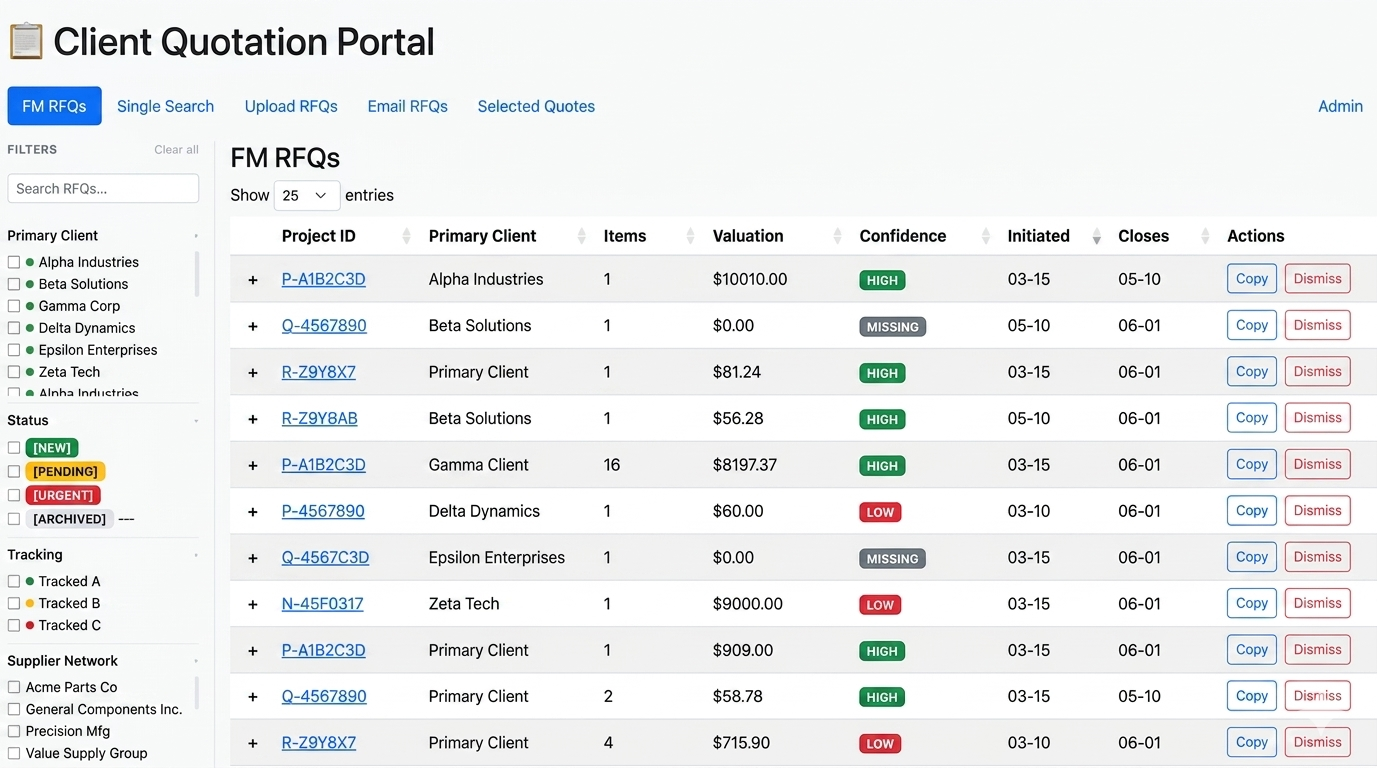
The moment our client knew the system worked wasn't a demo. It was a Tuesday morning.
Their procurement analysts walked in, opened the dashboard, and 80% of the day's work was already done. Overnight, the system had read the incoming quote requests, researched the vendors, pulled the pricing, and ranked the options. All that was left was a quick review and an approval. The work that used to consume their mornings, searching, comparing, compiling, had happened while they slept.
That's what an AI agent looks like when it's built for real work. Not a chatbot waiting for questions. A system that completes a workflow.
The Job Before the Agent
If you run a business that responds to quote requests, including procurement, wholesale, services, or logistics, you know this workflow even if you've never named it.
A request comes in. Someone on your team reads it, figures out what's actually being asked for, and starts researching: which suppliers can fulfill it, what the pricing looks like, what was quoted last time, who delivered well and who didn't. Then they compile it into something a decision-maker can act on.
For our client, each request took 15–45 minutes of skilled analyst time. Dozens came in every day. Volume was growing, headcount wasn't, and response times were slipping, which in B2B means losing deals to whoever answers first.
The painful part: most of that 30 minutes wasn't judgment. It was searching. Googling vendors, opening catalogs, cross-referencing spreadsheets. Skilled people doing mechanical work, because nobody had built the machine yet.
Agent, Not Chatbot
When most business owners hear "AI," they picture a chatbot, something that answers questions when asked. That's one narrow slice of what's possible, and honestly, often not the most valuable one.
An AI agent is different. It doesn't wait to be asked. It watches for work to arrive, makes a sequence of decisions, uses tools, including search, databases, and internal systems, and produces a finished result. If you want the full taxonomy, we've written about the five types of AI agents; this one is an orchestrator, the kind that runs a multi-step workflow end to end.
That distinction matters because the value lives in completion. A chatbot that answers "which vendors sell industrial fasteners?" saves you a minute. An agent that has already read the request, found the vendors, compared the prices, and ranked the options saves you the entire job.
The Anatomy: Four Stages
Here's what the system actually does, stage by stage. The architecture is specific to procurement, but the skeleton applies to almost any research-and-recommend workflow.
1. Intelligent intake. Quote requests arrive as unstructured text: emails, forms, attachments, each formatted however the buyer felt like formatting it. The agent's first job is reading: extracting the product type, quantities, specs, and deadlines into structured data. This is where a language model earns its keep: it handles the messy variety that used to require a human reader.
2. Vendor matching. With structured requirements in hand, the agent scores and ranks suppliers against them, using historical performance data, not just catalog listings. Who actually delivered on time? Whose pricing held up? The agent remembers what a busy human can't.
3. Pricing analysis. The agent pulls quote history and market benchmarks to put every bid in context. Is this price normal? High? An outlier worth questioning? This used to be the part where an analyst opened six browser tabs.
4. Ranked recommendation, then a human. The output is a ranked comparison report. A procurement manager reviews and approves it in minutes. The human didn't disappear from the loop; they moved to the end of it, where their judgment actually matters.
The full build is documented in our RFQ automation case study, including the architecture and the iteration cycles it took to get accuracy above 90% on production requests. You can also try the live demo: sandboxed, mock data, no signup required.
What Happened to the Analysts?
This is the question behind the question, so let's address it directly: did the people whose work got automated push back?
No, and it's worth understanding why. The tool didn't compete with the analysts. It took the part of their job they liked least. Nobody became an analyst because they love searching Google and pasting prices into spreadsheets. The agent does the research automatically; the analysts review results and spend their time on the work that actually requires them: negotiations, exceptions, relationships, judgment calls.
In practice, the team's capacity tripled without a single new hire. Same people, more throughput, better work. That's the honest version of "AI and jobs" that we see on the ground: the mechanical layer gets automated, and the humans move up a level.
The Numbers
Outcomes from this build, measured in production:
- Research time per request: from 30+ minutes to under 60 seconds
- Team capacity: effectively tripled, with zero added headcount
- Recommendation accuracy: above 90% on production requests after the second build iteration
- Every recommendation has a full audit trail, important for compliance and for trust
Note the phrase "second build iteration." The first version wasn't this good, and that was expected. AI systems are grown on real data, not specified perfectly upfront. If you're weighing an investment like this, our AI ROI calculator can help you put your own numbers on the time being lost to manual research.
The Pattern You Can Copy
You probably don't process RFQs. That's fine. The pattern is the point, and it transfers to sales research, customer support triage, market monitoring, claims processing, and a dozen other workflows. Here's the framework:
Find the repeated research. Where does someone on your team repeatedly gather, compare, and compile information before a decision gets made? That's your candidate. If you're not sure where to start, our AI use case finder walks through it by industry.
Map the decisions. Write down the steps. Mark each one: is this mechanical (find, fetch, compare, format) or judgment (negotiate, approve, handle the weird exception)? Be honest, most workflows are 80% mechanical.
Automate the mechanical, keep humans on judgment. The agent handles intake through recommendation. A person approves. You get the speed of automation with the accountability of human sign-off.
Expect iteration. Version one will be imperfect. Production data is what makes it good. Plan for build cycles, not a single delivery date.
One caution from experience: simple no-code automation tools are great until the workflow requires actual interpretation. If you've already hit the ceiling of connecting apps with triggers, you're not alone. We've written about why basic automation tools stop being enough once the work involves reading, judging, and deciding.
The Takeaway
The best AI agent in your business won't look impressive in a demo. It will look like a quiet dashboard on a Tuesday morning with 80% of the day's work already done, and your best people finally spending their time on the 20% that needs them.
If your team spends significant time on repetitive research, comparison, or routing, the same anatomy applies: intelligent intake, matching, analysis, ranked recommendation, human approval. We've applied it across multiple industries. It scales.
Have a workflow that fits this pattern? Explore AI Agent Development →
Get the next one in your inbox
One practical AI idea per week, from real client projects. No fluff, unsubscribe anytime.