How Do You Productionalize a GenAI Proof of Concept? The 4 Things That Break First
By Amin Rabinia · Founder, Glissando AI
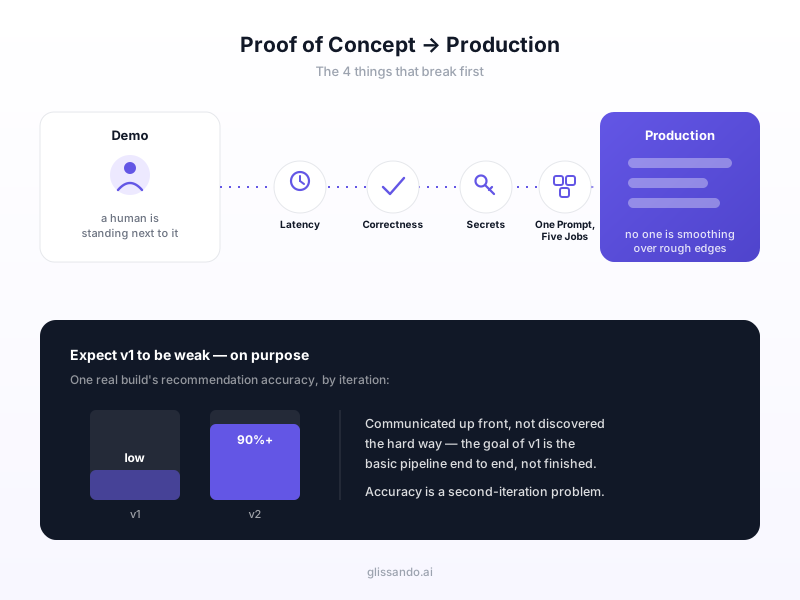
A GenAI proof of concept almost always works. That's not a compliment; it's the trap. It works because someone is standing next to it: picking a good input, rerunning the call when the output comes back wrong, narrating around the rough edges so the room sees the intended result instead of the actual one. Production doesn't have that person. The same system now has to handle inputs nobody anticipated, fail safely when it's wrong, and put something in front of a customer with nobody smoothing it over in real time. That gap, not the model, not the prompt, is where most GenAI PoCs stall on the way to production.
We wrote a shorter version of this inside our general PoC-to-MVP guide. This is the deeper piece, specific to GenAI, because generative systems fail in ways a normal software PoC doesn't: the output isn't deterministic, "correct" isn't a fixed test case, and the thing doing the work is a prompt someone wrote in an afternoon.
Why the Demo Lies to You
In a demo, someone picks a good input, reruns it when the output is wrong, and narrates around the rough edges. That's not dishonesty; it's just what a human does automatically when they're driving. In production, nobody does any of that. The input arrives however a real customer typed it. If the output is bad, there's no one to notice and quietly try again. If the model is slow, there's no one explaining "it's just the demo environment" while everyone waits.
That's the actual definition of productionalizing a GenAI system: removing the human who was invisibly compensating for the gaps, and finding out what those gaps actually were. Four of them show up on almost every build we've done.
1. Latency the Architecture Can't Absorb
If your generation step takes minutes, no amount of model optimization fixes it. The request shape itself is wrong. A synchronous request that takes 90 seconds might survive a demo where everyone's watching the screen together. It does not survive a real user sitting on a loading spinner, and it definitely does not survive a hosting timeout, which will kill the request outright regardless of how patient the user is.
We hit this directly building a video product where a full render takes 10–20 minutes, nowhere close to a request timeout. The fix wasn't a faster model. It was changing the architecture: return something useful fast (a preview, in our case within 30–70 seconds), then do the expensive work as a background job and notify the customer when it's actually ready. We wrote up the full pattern here: why AI generation apps need a background job queue. The rule of thumb: if your generation step can plausibly run past 10 seconds, design for async from the start rather than discovering the timeout in production.
2. No Definition of Correct, Per Use Case
A demo is judged by "that looks right": someone glances at the output and moves on. Production needs an actual definition of correct, and it needs one for every use case the system touches, not one blanket standard for the whole product. Most teams only ever check the one or two failure modes they can already imagine, hallucination, maybe bias, and never build the rest of the picture, because without a structure to work from, you only see the risks that are already on your mind.
The fix is a matrix, not a longer checklist: every use case the system is deployed for, crossed with every evaluation dimension that actually matters for that use case. On a real evaluation-strategy engagement we designed a six-branch taxonomy: output quality, structured output integrity, safety and policy compliance, robustness, transparency, and efficiency/cost, plus a registry mapping each evaluator to how it's actually measured, and scenario cards mapping real use cases to which evaluators apply. You can read the full breakdown in the evaluation taxonomy case study. It doesn't have to be that formal on day one; even a one-page version, listing your top three use cases and the two or three things that would make each one wrong, beats deciding what "correct" means after the first customer complaint.
3. Secrets That Were Fine in a Prototype
An API key that lived in a config file during the demo becomes a real liability the moment the thing is public. This isn't hypothetical for us. We had a vibe-coded early build expose a key, and the lesson wasn't "rotate the key." It was that a prototype accumulates plaintext secrets in places nobody audits, because during the demo phase nothing about it is public, so nothing about it gets scrutinized.
The actual remediation was auditing everywhere a secret could sit in plaintext: config files, client-side JS, commit history, and log output, not just the one key that got flagged. If you're moving a GenAI PoC toward production, treat this as a mandatory step rather than an if-something-looks-wrong step: grep the whole codebase for anything that looks like a credential, move what you find into a real secret manager, and rotate everything that was ever exposed during the prototype phase, not just the one instance you happened to catch.
4. One Giant Prompt Doing Five Jobs
A single prompt that handles intake, reasoning, formatting, and edge cases all at once holds together fine in a demo, because a human is there to notice when one part goes wrong and adjust. In production it becomes undebuggable, because when the output is wrong there's no single place to look: you're staring at one prompt trying to guess which of its five responsibilities failed this time.
The fix is splitting by real job boundaries, not for its own sake, but because each split gives you a place to look when something breaks. The rule we actually use: split into a separate step when it needs its own context, its own data source, or has its own distinct failure mode. We laid out the full decision rule in how many AI agents your product actually needs. The short version is that a five-agent pipeline where each agent owns one job is easier to fix than a one-agent pipeline doing five jobs, even though it looks more complex on a diagram.
Expect Version One to Be Weak, On Purpose
The most useful mindset shift in this whole process is accepting that your first production version will underperform the demo, and planning for it out loud instead of being surprised by it later.
On the RFQ automation build, version one had low accuracy, low speed, and low coverage, and that was communicated to the client up front, not discovered by them the hard way. The goal of v1 wasn't a finished system. It was getting the pipeline doing the most basic version of the task end to end: search, retrieve, filter, classify, so there was something real to measure and improve against. Recommendation accuracy passed 90% after the second build iteration, not the first. You can see where that pipeline ended up in the RFQ automation case study. It only worked because expectations were set against a roadmap, not against how good the demo looked.
A PoC that gets treated as a nearly-finished product is the single most expensive misunderstanding in GenAI development. It's permission to start, not proof that you're almost done. The same discipline of launching a deliberately incomplete first version and improving it against real usage is why we build every AI product in phases rather than all at once; why AI projects need iteration covers the reasoning in more depth.
What This Means for You
None of these four things are exotic, and none of them require a bigger model or a different vendor. They're just invisible while a human is quietly driving the demo, which is exactly why a GenAI PoC can look finished and still be months away from something you can hand to a real customer. Before you commit to a launch date, walk through the four: does the generation step need to become async, do you have an actual definition of correct for each use case, have you audited for plaintext secrets, and is any single prompt doing more than one job? Then budget for v1 to be worse than the demo, on purpose, because that's the version that's actually true.
If you're staring at a working GenAI demo and trying to figure out which of these four gaps applies to you, Get Expert Input and we'll walk through your specific build.
This post is part of the Building with AI Guide, covering everything we've written on turning an AI idea into a working product.
Related reading
Get the next one in your inbox
One practical AI idea per week, from real client projects. No fluff, unsubscribe anytime.