Why Is Your AI App So Slow? Background Job Architecture for AI Generation Apps
By Amin Rabinia · Founder, Glissando AI
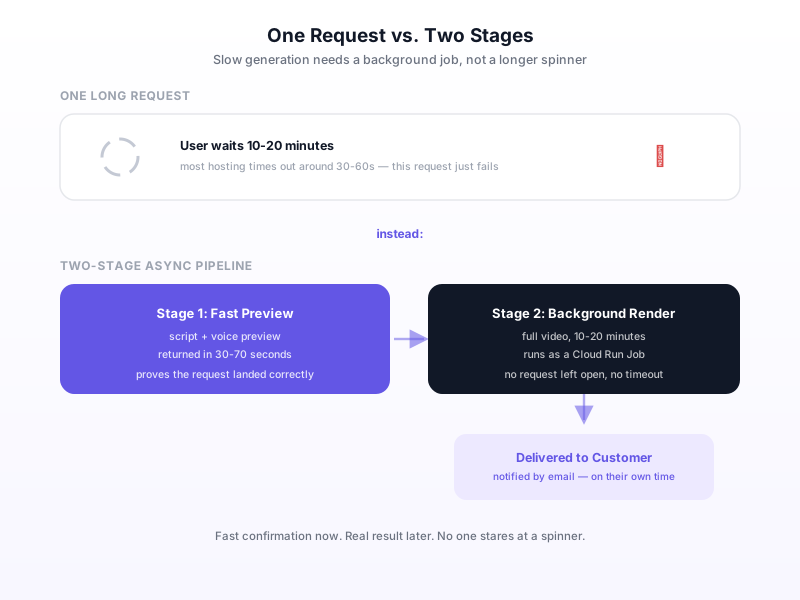
If your AI app generates something that takes real time, a video, a long document, a complex report, and your first instinct is "I need a faster model," that's usually the wrong fix. The actual problem is architectural: you're making a user wait on one long request for something that should never have been a single request in the first place. Faster models help at the margins. They don't fix an app built around the wrong shape of interaction.
We ran into this directly building Honored Memory and Loyal Memory, two live AI video generation products. A full render takes 10 to 20 minutes, nowhere close to something a user should sit and watch a spinner for, and nowhere close to something most web infrastructure will even let you attempt as one request.
The Mistake: Treating Slow Generation Like a Slow Page Load
A page that takes three extra seconds to load is a performance problem: optimize the query, add a cache, done. Generation that takes ten minutes is a different category of problem entirely, and treating it like a performance issue leads to the wrong fix: trying to make the model faster, when the real issue is that no user experience should ever be built around a human staring at a spinner for ten minutes, no matter how fast the underlying model eventually gets.
The tell that you're in this situation is simple: if the honest answer to "how long will this take" is measured in minutes, not seconds, you don't have a latency problem to shave down. You have a request that should never have been synchronous in the first place. That's a design decision, not a performance target.
The Fix: Split It Into Two Stages
The pattern that actually works is a two-stage pipeline: return something real and useful fast, then do the expensive part in the background and tell the customer when it's done. In the video-generation build, stage one produces a script and a voice preview in 30 to 70 seconds, fast enough that it doesn't feel like a wait at all. Stage two, the actual rendered video, runs as a background job that takes 10 to 20 minutes and emails the customer on delivery.
The customer isn't staring at a progress bar for the full ten minutes. They get something real almost immediately: proof the system understood their request correctly, and then get notified when the finished product is ready, on their own time. That's not a workaround for the slow part; it's a better experience than a synchronous version would have been even if the render somehow took no time at all, because it doesn't force the customer to sit and wait through anything.
Infrastructure Will Force This Decision Whether You Plan for It or Not
A 60-second proxy timeout on our hosting made a single long request a non-starter anyway. That constraint wasn't a nuisance to work around, it was the thing that forced the right architecture into existence. Most hosting and load-balancer setups have a similar hard ceiling somewhere between 30 seconds and a couple of minutes, and a ten-minute generation job will simply fail as one request on almost any standard setup, independent of whether you've thought about UX at all.
That's worth knowing before you build: if your product's core action takes real time, the background-job architecture isn't an optimization you can add later; it's close to mandatory from day one, because the infrastructure itself won't let you launch the naive synchronous version even if you wanted to. Better to design for it from the start than to discover it the hard way when a customer's request times out mid-generation with nothing to show for it.
What Goes Where
The split isn't arbitrary: stage one should be whatever proves the system understood the request correctly and gives the customer something to react to, and stage two should be whatever is actually expensive: rendering, heavy computation, anything that genuinely needs minutes rather than seconds. In the video build, that's a script and voice preview (fast, cheap, reassuring) versus the full rendered video (slow, expensive, the actual deliverable). The same split works for AI document generation (outline fast, full formatted document in the background), batch report generation (a summary now, the full report later), or any product where the AI does meaningful work that can't be compressed into a few seconds no matter how good the model gets.
This is the same instinct behind splitting agent responsibilities by genuine job boundaries rather than by convenience: the two stages here aren't split because it's easier to build, they're split because they're genuinely different jobs with different latency requirements, and forcing them into one request tangles a fast, cheap confirmation with a slow, expensive deliverable that never belonged together.
What This Means for Your Build
If your AI product does anything that takes real time, such as video, long-form documents, or complex multi-step generation, the fix for "it feels slow" almost never starts with a faster model. It starts with asking what a customer can be shown immediately that proves the request was understood, and treating everything expensive as a background job that notifies on completion instead of a request someone has to sit through. The full two-stage pipeline, including exactly what runs in each stage, is documented in the AI Video Generation SaaS case study, alongside the five-agent system that produces both stages' output.
If you're scoping an AI product with a genuinely slow generation step and aren't sure how to split it, that's exactly the kind of architecture question worth getting right before you build. Get Expert Input, a paid session where we look at your actual generation pipeline and help you find the right two-stage split.
This post is part of the Building with AI Guide, covering MVP scoping through architecture decisions that hold up as a product grows.
Related reading
Get the next one in your inbox
One practical AI idea per week, from real client projects. No fluff, unsubscribe anytime.