AI Agents for Non-Technical Teams: What Actually Makes Them Usable
By Amin Rabinia · Founder, Glissando AI
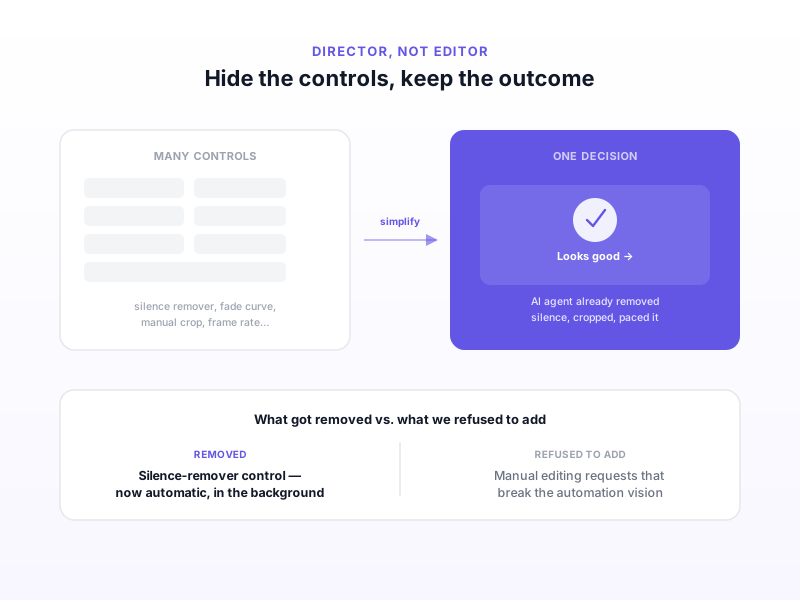
When we built an AI tool for editing YouTube Shorts, the early version had a control for almost everything an editor might want: trim points, a silence remover, fade curves, crop adjustments, pacing. It looked thorough. It also made the tool feel exactly like the editing software it was supposed to replace.
The fix wasn't adding more AI. It was removing controls — including ones creators had specifically asked for.
The Tool Nobody Asked to Use Twice
The shorts editor we built takes long-form video and an AI agent turns it into short, vertical clips ready for posting. Early on, we gave users a lot of control over how that happened — a deliberate choice, because it felt safer to let people fine-tune rather than trust the system fully.
One of those controls was a silence remover: a toggle and a sensitivity slider for cutting dead air out of clips. It worked. It also required the user to understand what "sensitivity" meant in this context, preview the result, and adjust if it cut too aggressively or not enough.
That's editing. The user wasn't directing an outcome — they were operating a tool, the same way they would in any conventional video editor. The AI had automated the mechanics of cutting silence, but it hadn't automated the decision of how much silence to cut. The judgment call was still on the user, just with a slicker interface around it.
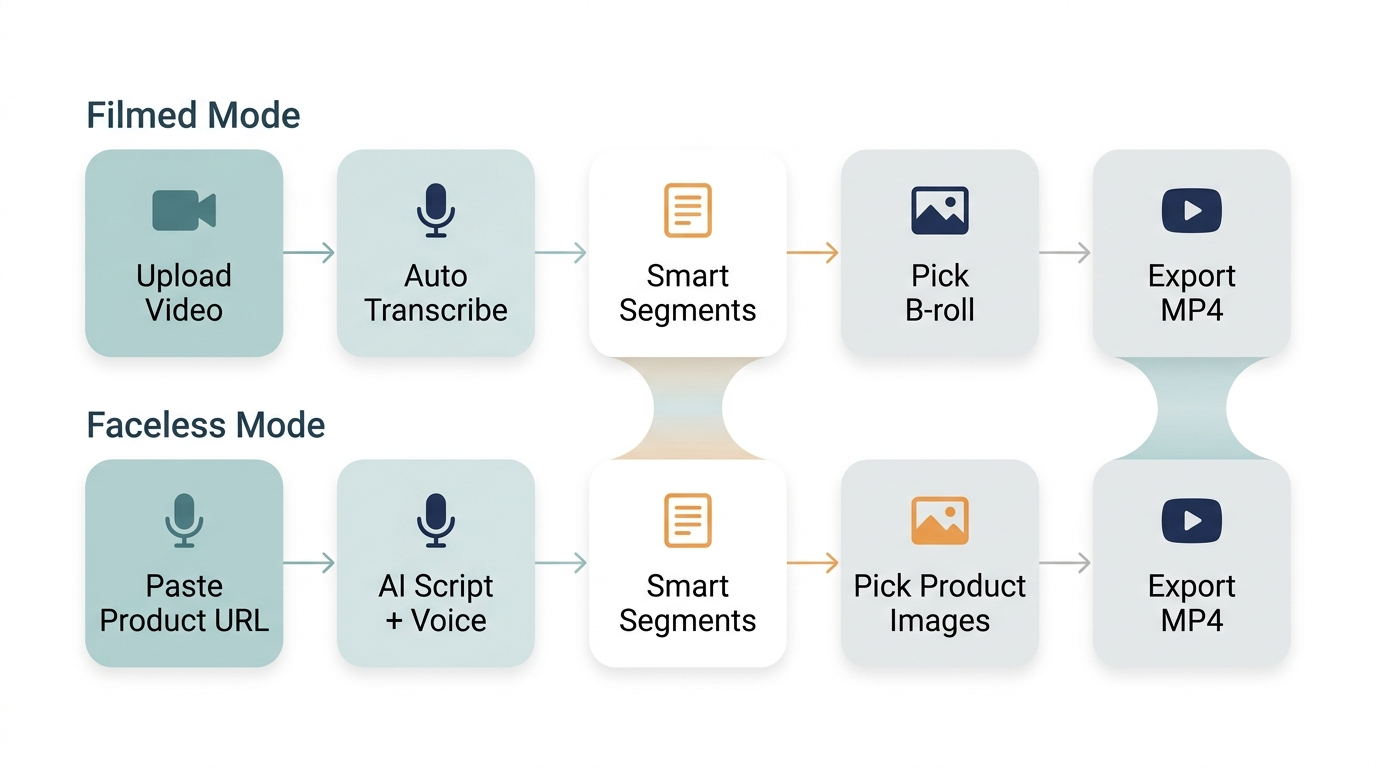
The actual pipeline — two modes, same principle: the user picks inputs and approves output, the agent handles every step between.
What "Director, Not Editor" Actually Means
A director on a film set doesn't operate the camera or the lighting rig. They say what they want the shot to feel like, and the crew translates that into technical decisions. The director's judgment is about outcome — mood, pacing, story — not about which dial to turn.
For an AI tool aimed at non-technical users, this is the actual design target: every interaction should be a judgment call about outcome, not an operation on a control. "Make this feel punchier" is a director's instruction. "Set silence-removal sensitivity to 0.7" is an editor's instruction. If your interface only offers the second kind, you've built a faster editing tool, not an AI tool that removes the need to edit.
This is a sharper version of an idea we've written about before: prompting isn't product design. A good AI product doesn't ask users to specify mechanics in any form — slider, prompt, or otherwise. It asks them what they want and handles the mechanics itself.
What We Actually Removed
We removed the silence-remover control entirely. Silence removal still happens — it just happens automatically, in the background, as part of producing the clip. There's no toggle, no sensitivity slider, no preview-and-adjust loop. The agent makes that decision the way an experienced editor would, consistently, without asking the user to weigh in.
Over time, this pattern extended to nearly everything else in the tool. Decisions that used to require a manual setting — crop framing, pacing, where to cut — moved into the AI agent's judgment, with human intervention decreasing as the system got more reliable at making good calls. The user's job narrowed down to: pick the source video, describe what they want, and approve or reject the result.
This mirrors what we found building a fully autonomous YouTube content pipeline — human judgment doesn't disappear from a well-automated system, it just moves to a higher level. Here, it moved from "how much silence to remove" to "does this clip feel right."
What We Refused to Add
This is the part that's harder to talk about, because it meant saying no to actual user requests. Some creators asked for more manual capabilities — finer control over cuts, custom transition options, manual override toggles for specific effects.
We turned most of these down. Not because they were technically difficult, but because they were unsystematic — one-off requests that would have compromised the long-term vision of full automation. Every manual control you add is a decision the AI agent no longer needs to get right, which means it's a decision your system stops improving at. Add enough of them and you've quietly rebuilt a manual editor with an AI veneer.
The harder, more valuable work was always: when a creator's request pointed at a real gap, fix it in the automated logic, not by handing them a new switch. If users consistently wanted punchier pacing, that became a property of the underlying editing logic — not a new slider in the UI.
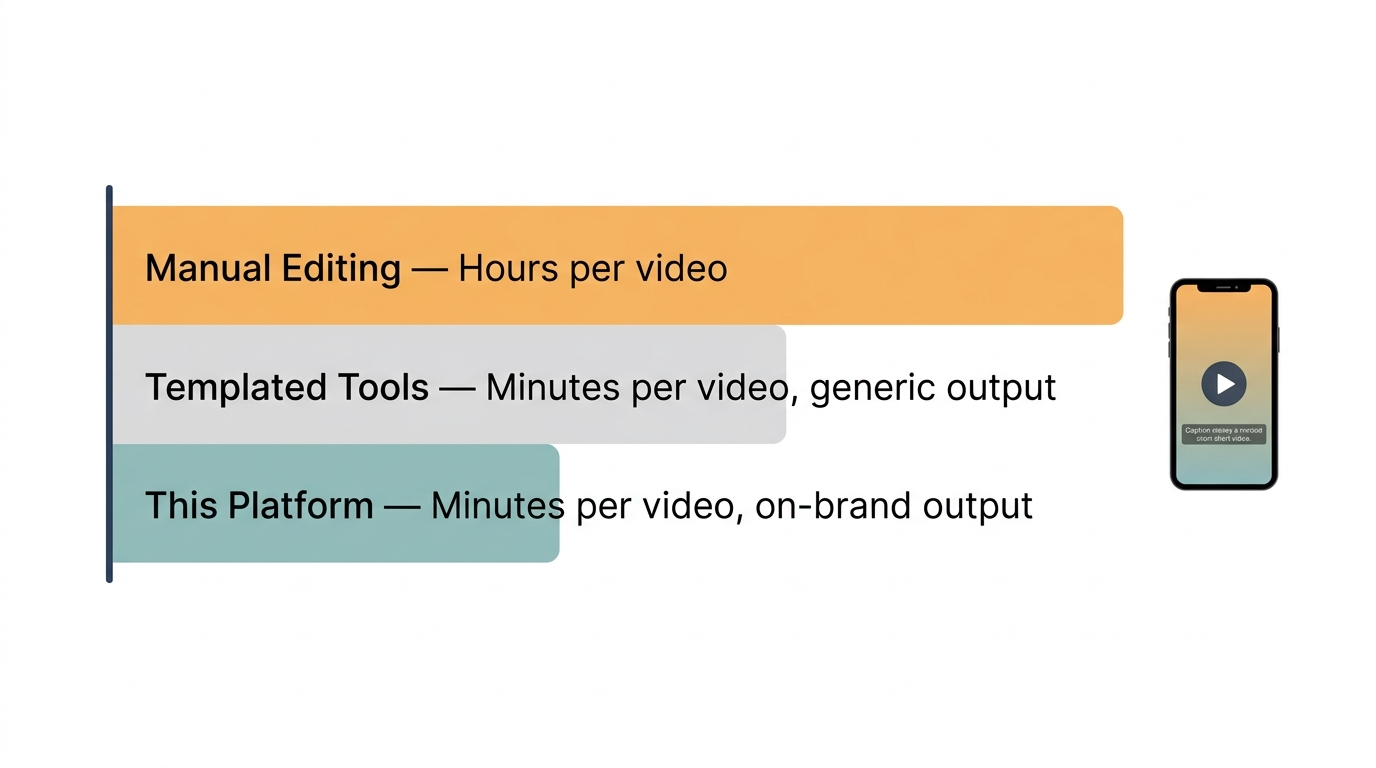
Removing controls didn't just simplify the UI — it's what made minutes-per-video with on-brand output possible in the first place.
Where This Pattern Applies Beyond Video
"Let the user be a director, not an editor" isn't specific to video editing. It applies anywhere experts currently do mechanical work that an AI agent could absorb: a marketer manually tagging campaign assets, an operations lead manually routing support tickets, a designer manually resizing the same layout for ten platforms.
In each case, the design question is the same: is the user being asked to make a judgment call, or to operate a control? If it's the latter, there's a hidden opportunity to push that decision into the system and ask the user for outcome instead. This is closely related to the distinction between an AI product's core function and its surface features — the function is usually the judgment call you're trying to remove the friction from; everything else is a control that probably shouldn't exist.
What This Means for You
If you're designing or commissioning an AI tool for non-technical users, audit every control in the interface and ask: is this a decision the user actually wants to make, or a decision they're being forced to make because the system isn't confident enough to make it for them?
Controls that exist because users explicitly want creative input are worth keeping. Controls that exist because the AI agent couldn't yet handle that decision reliably are technical debt dressed up as a feature. The fix isn't a better slider — it's a better-trained, more trusted decision inside the system.
If you're not sure which of your product's controls are which, that's a useful thing to look at with someone outside the project. Get Expert Input — a paid session where we look at your interface and help you separate real creative control from automation you haven't finished yet.
This post is part of the AI Agents Guide — from the basics to the technical depth behind agents that actually work.
Related reading
Get the next one in your inbox
One practical AI idea per week, from real client projects. No fluff, unsubscribe anytime.